How to Choose a Chromatography Data System (CDS)

Choosing a chromatography data system (CDS) is one of the most consequential software decisions a laboratory makes — yet it’s often approached in the wrong way.
Labs frequently ask:“What is the best CDS?”
In practice, that question almost always leads to poor outcomes.
There is no single “best” chromatography data system. What works well in one laboratory can become a long-term constraint in another. The difference usually comes down not to features, but to whether the system fits the lab’s instruments, workflows, regulatory expectations, and long-term realities.
This article provides a practical, vendor-neutral framework for how laboratories should think about choosing a CDS — before comparing products or requesting quotes.
Watch the Video
If you prefer to read, the article below follows the same evaluation framework covered in the video, with a little extra structure for quick internal review and sharing.
Start with the Right Framing
A chromatography data system is not just software that draws peaks.
Once implemented, a CDS becomes tightly embedded in how a lab:
Acquires and stores chromatographic data
Processes and reports results
Manages audit trails and user actions
Maintains long-term access to historical data
Handles upgrades, validation, and IT change
Because of this, CDS decisions tend to have a much longer lifespan than expected. Labs often live with the consequences for many years, even as instruments, operating systems, and personnel change.
That’s why the most important step is not choosing a product — it’s choosing the right evaluation framework.
A Practical Framework for Evaluating a CDS and how to choose a chromatography data system
Rather than starting with feature lists or vendor claims, labs are better served by working through a small number of fundamental questions.
The sections below outline the areas that most strongly determine whether a CDS will succeed or quietly become a source of friction over time.
1. Instrument Ecosystem Fit

Some laboratories operate almost entirely within a single instrument vendor ecosystem. Others run mixed environments — often with instruments spanning multiple manufacturers and generations.
A CDS may be designed primarily to:
Integrate tightly with a specific vendor ecosystem, or
Support a broader range of instruments across different vendors and vintages
Neither approach is inherently superior. The problem arises when a system is selected without fully accounting for how the lab’s instrument landscape may evolve.
A CDS that fits today’s instruments but limits future flexibility can become a constraint rather than an asset.
2. Compatibility and Integration Approach

Behind the scenes, chromatography software connects to instruments in different ways.
Some systems rely on native drivers developed and maintained directly by the CDS vendor. Others depend on integration layers or external instrument control platforms.
From an evaluation standpoint, what matters is not the technical detail, but the implications:
How upgrades are handled
Where dependencies sit
What changes when instruments or operating systems are updated
Understanding the compatibility model helps labs avoid surprises later in the system’s lifecycle.
3. Workflow Fit — Not Just Feature Coverage

A CDS that looks impressive in a demonstration can still be a poor fit for daily work.
Labs should consider how analysts actually operate:
Routine QC versus exploratory or research work
Frequency of method changes
Review and approval practices
Reporting expectations
A system optimized for one type of workflow may feel cumbersome in another. The goal is not maximum flexibility or maximum automation, but alignment with real-world use.
4. Data Integrity and Audit Expectations
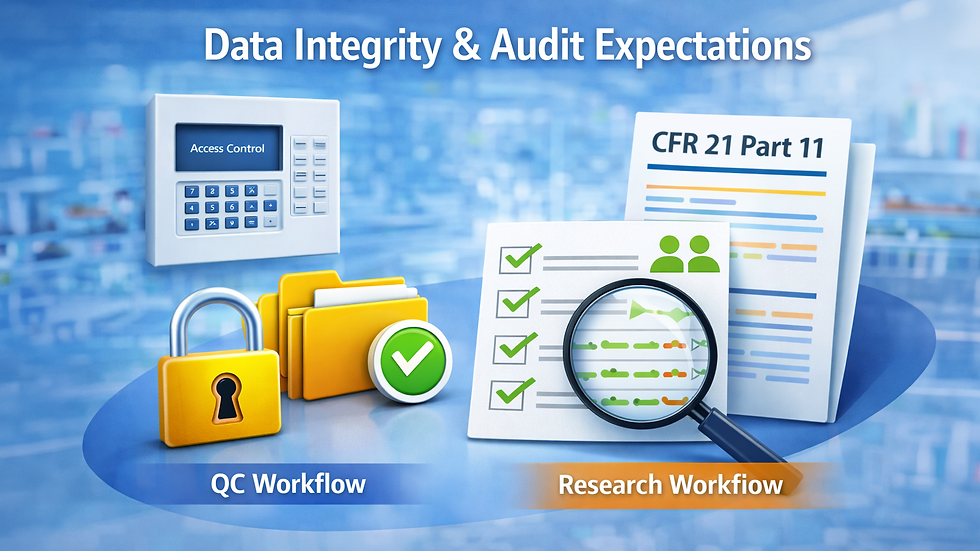
Even in laboratories that are not fully regulated, data integrity expectations tend to increase over time.
Questions worth asking include:
What actions are logged?
How changes are tracked?
How easily audit information can be reconstructed later
Whether the system can support future regulatory or quality requirements if needed
Choosing a CDS with a clear, transparent approach to data integrity reduces risk as expectations evolve.
5. Reporting and Long-Term Data Access

One of the most common long-term frustrations with chromatography software is historical data access.
Labs should consider:
Whether data files remain usable across software versions
How tightly reports are bound to specific environments
What happens to legacy data when systems are upgraded or replaced
A CDS should protect the lab’s data from time, not trap it within a narrow technical window.
6. IT Footprint and Lifecycle Reality

Every CDS has an IT footprint, whether it is visible during evaluation or not.
This includes:
Operating system dependencies
Upgrade frequency and disruption
Validation effort when changes occur
Responsibility split between the lab and central IT
Ignoring lifecycle and support realities is one of the most expensive mistakes labs make when selecting software.
What Matters Most — and What Often Doesn’t

In practice, successful CDS implementations tend to prioritize:
Instrument fit
Workflow alignment
Data longevity
Support and lifecycle stability
Factors that often receive too much attention include:
Long feature checklists
Interface cosmetics
Marketing claims about being “best” or “most advanced”
A good CDS is one that integrates quietly into the lab and continues to do so as conditions change.
Vendor CDS and Independent CDS — A High-Level View

At a high level, the CDS market broadly includes:
Vendor-supplied systems designed around specific instrument ecosystems
Independent systems designed to support a wider range of instruments and longer-term continuity
Chromperfect is one example of an independent CDS, but it is not the only option. The right choice depends entirely on the laboratory’s priorities, constraints, and future plans.
Six Questions to Ask Before Choosing a CDS
Before committing to any chromatography data system, labs should be able to answer the following:
What instruments do we run today — and what might change?
How do analysts actually work, day to day?
What happens to our data when systems are upgraded?
How much regulatory overhead do we realistically need?
Who owns the IT burden — the lab or central IT?
Will this system still serve us five or ten years from now?
Clear answers to these questions usually make the right choice far easier to identify.
Final Thoughts
Choosing a chromatography data system is not about finding a universal winner. It is about selecting a system that fits a specific laboratory — today and in the future.
By starting with the right framework, labs can avoid costly missteps and make decisions they won’t need to undo later.


Comments